


Contraction Timer & Counter
4.250.00 Reviews
App Specs
- Version
- 1.30.0
- Updated On
- License
- Free
- Downloads
- 1,000,000+
- Developer
- Wachanga
- Categories
- Parenting
- Platform
- Android, iOS
Screenshots


 Analysis by AppCompare
When contractions begin, even an ordinary question like “How long has this one lasted?” can be hard to answer calmly. I like the idea behind Contraction Timer & Counter: use a phone to record what is happening, rather than trying to remember each start and finish while concentrating on the moment. It is a focused parenting app from Wachanga, and its value is less about replacing anyone’s judgment than giving you a simple record to refer to.
What to expect from a contraction timer
This is a tool for timing contractions and watching how they develop over a session. The practical benefit is having durations and intervals recorded in one place, so you can describe a pattern more clearly when you speak with your healthcare provider. That can be useful when you are tired, distracted, or unsure whether what you are feeling is changing.
It is worth setting expectations before you rely on any timer. A pattern on a screen is information, not a diagnosis or a decision about when to travel. Your own care team’s instructions and the way you feel still matter. I would keep their phone number easy to reach and treat the app as a note-taking aid, not as a substitute for medical guidance.
Why Use a Contraction Timer?
Okay, so picture this: you're in the final stretch of pregnancy, and suddenly, you feel a twinge. Is it a Braxton Hicks, or is it the real deal? That's where the Contraction Timer & Counter app becomes your best buddy. It's designed to help you track the frequency and duration of your contractions, giving you peace of mind and helping you decide when it’s time to head to the hospital.
Getting Started
First off, the app is super easy to download and set up on both Android and iOS. Once installed, you’re greeted with a clean and intuitive interface. Honestly, the developers did a great job here. You don’t need to be a tech whiz to navigate through it, which is a relief when you're dealing with all those pregnancy hormones!
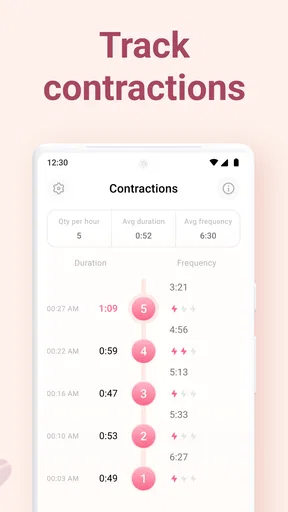
As soon as you feel a contraction, just tap the "Start" button. When it ends, tap "Stop." The app then logs the duration and frequency of your contractions. Over time, you'll see a neat little chart that shows your contraction pattern, making it easier to determine whether it’s time to call your healthcare provider.
Make the first session easier
For a first-time user, I would open the timer once before labor and locate the start and stop controls so they feel familiar. There is no need to turn practice into a complicated rehearsal: the useful part is knowing where to tap and being comfortable with the basic sequence. If you are sharing the task with a partner or support person, agree in advance who will operate the phone. That avoids a small but distracting debate when a contraction begins.
Worth Reading Before You Choose

EA SPORTS FC Mobile 26 Is a Bigger Football Game, but It Takes Time

Flipboard Shows What News Apps Must Do Beyond the Feed

Switching to Android Auto Means Rethinking Your Driving Routine

Google Calendar Makes a Crowded Week Easier to Manage

Ludo King Makes the Most of the Minutes Between Plans

Baby Panda World Brings Quick Play to Modern Phones, but Its Game Library Feels Busy
During a real session, aim for consistent timing rather than perfect timing. Start when you recognize a contraction and stop when it eases; if you miss a tap or get interrupted, don’t let that make you anxious. One imperfect entry does not make the rest of the log useless. A short note to your provider about how you felt can add context that a duration alone cannot show.
Features That Stand Out
One of the standout features is the ability to view your contraction history. The app doesn’t just track one session but keeps a comprehensive log of all your contractions. This means you can show your healthcare provider a detailed report, helping them make informed decisions about your labor progress.
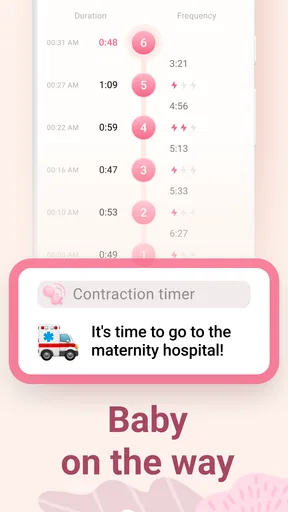
Another cool feature is the notification system. If your contractions start to form a regular pattern that suggests active labor, the app alerts you. It’s like having a mini midwife in your pocket!
Reading the pattern without overreading it
A log is most useful when it helps you report what happened, not when you treat it as an automatic verdict. If the intervals seem to change, look at the overall sequence and how you feel rather than reacting to a single short or long gap. Contractions can be difficult to time precisely, especially while moving, breathing through discomfort, or changing position. That is one reason I would use the recorded pattern as a conversation starter with a clinician, not as a rule that overrides their advice.
A practical division of labor can make tracking less intrusive: one person can focus on timing while the pregnant person rests, moves, or uses whatever coping approach feels right. If you are alone, keep the process as simple as possible and do not feel obliged to watch the screen between contractions. The timer is there to reduce mental bookkeeping, not add another task to manage.
Where it fits among the alternatives
The usual alternative is timing by hand with a clock, notes app, or a partner keeping track. Those methods can work, especially if you already have a routine that feels comfortable. A dedicated contraction timer is more purpose-built: it puts repeated start-and-stop entries into a single record rather than asking you to calculate or organize them later. The trade-off is that it depends on having your phone available and remembering to use it, while a simple spoken update or paper note may feel easier for some people.
I would choose this app if you want a focused way to capture a sequence and share the history with your care provider. I would skip it, or use it only as a backup, if screens make you more anxious, you prefer another person to handle all timing, or your clinician has given you a specific plan that does not depend on contraction intervals. No app should make you delay contacting care when you are concerned.
Everyday details that matter
Imagine contractions start while you are at home and your partner is gathering the things you planned to take with you. Instead of asking each other to remember when the last one began, one person can tap the timer and keep the sequence in view. Later, when you call your provider, you can describe what you have been recording. The benefit is modest but real: fewer details have to stay in your head during an already demanding moment.
Battery preparation is more useful than it sounds. Keep your phone charged before the final weeks, and consider whether the person helping you can take over if you need to put the phone aside. If the phone is being used for calls, directions, or messages too, timing is only one part of the practical plan. A familiar charging spot and an agreed backup person can prevent the app from becoming a source of avoidable stress.
It is also sensible to think about the handoff before you need it. Decide what you want to tell your provider: when the pattern began, what has changed, and how you are feeling. The app’s record can support that conversation, but your description remains important. If a displayed trend and your instincts seem out of step, call your care team rather than waiting for the screen to look a certain way.
Price, access, and who it suits
The app is free to install, with in-app purchases available, so you can consider the basic experience before deciding whether any optional purchase is worthwhile. It is rated for Everyone and has an average rating of 4.0 from around 15,000 ratings, with more than a million installs. Those figures suggest it has reached many users, but they cannot tell you whether its approach will suit your preferences or care plan.
It is currently at version 1.27.0 and requires Android 9 or later on Android devices. If you are choosing a phone for the person who will time contractions, check compatibility ahead of time rather than discovering an installation issue during labor. The app is a better fit for someone who wants a straightforward timer and history than for someone looking for a broad pregnancy planner or a replacement for professional support.
Practical Tips
Using the Contraction Timer & Counter app, I found a couple of helpful tips. First, make sure your phone is always charged. The last thing you want is a dead battery when you need it most. Also, familiarize yourself with the app features before you actually need to use it. Trust me, practice a few test runs during your third trimester to get comfortable with it.
One minor thing to be aware of: the app doesn’t replace professional medical advice. Always have your healthcare provider’s number handy and don’t rely solely on the app for critical decisions.
What I would decide before labor
If you are still deciding whether to install it, ask yourself one simple question: would a written timing record help you feel more organized, or would checking a phone pull your attention away from what helps you cope? There is no universally right answer. You can install it, learn the basic controls, and decide with your support person whether it belongs in your plan. If you do not want to use it later, a clock and a calm helper remain reasonable alternatives.
I would also make sure everyone involved understands that the app records timing rather than interpreting the full situation. A support person can keep the phone nearby, take over tapping if needed, and help contact the care team when appropriate. That arrangement leaves the person in labor free to focus on comfort instead of explaining how the timer works in the moment.
Final Thoughts
The Contraction Timer & Counter app is a simple yet effective tool that can make a big difference during labor. Its user-friendly interface and helpful features provide expecting parents with the confidence to navigate the uncertainties of labor. I’d say this app is a must-have for anyone preparing to welcome a new baby into the world. Download it, test it out, and when the time comes, let it help guide you through one of life’s most memorable moments.
My recommendation is a little more specific: it is worth trying if you want a dedicated record and can use it without feeling tied to the screen. Its main strength is taking repeated timing off your memory; its main limitation is that a timer cannot tell the whole story or make care decisions for you. Prepare it ahead of time, keep your provider’s guidance central, and use the record only insofar as it makes the experience clearer and calmer.
Pros
- User-friendly interface for easy navigation.
- Accurate timing for contractions tracking.
- Customizable alerts for contraction intervals.
- Data export option for doctor consultations.
- Free version offers essential features.
Cons
- Ads in the free version can be intrusive.
- Limited features without premium upgrade.
- No integration with health apps.
- Requires manual data input for accuracy.
- Battery consumption is relatively high.
FAQs for Contraction Timer & Counter
What is the primary function of the Contraction Timer & Counter app?
The Contraction Timer & Counter app is designed to help expectant parents track labor contractions accurately. It allows users to log the duration and frequency of each contraction, providing insights into labor progression. This information can be crucial for determining when to head to the hospital or call a healthcare professional.
Is the Contraction Timer & Counter app user-friendly for first-time parents?
Yes, the app is designed with a simple and intuitive interface that is easy to navigate, even for first-time parents. It features straightforward controls for starting and stopping the timer, and clearly displays contraction history, helping users feel more in control during the labor process.
Does the app provide any additional features besides timing contractions?
Aside from timing contractions, the app often includes features such as contraction history logs, graphs to visualize contraction patterns, and alerts to notify when it might be time to seek medical attention. Some versions may also offer educational content about labor and delivery, making it a comprehensive tool for parents-to-be.
Is the Contraction Timer & Counter app available for both Android and iOS devices?
Yes, the Contraction Timer & Counter app is typically available for download on both Android and iOS platforms. Users can find it in the Google Play Store and Apple App Store, ensuring accessibility regardless of the device being used. Always check compatibility with your device version before downloading.
Are there any costs associated with using the Contraction Timer & Counter app?
While many contraction timer apps offer a free version with basic features, some may have in-app purchases or premium versions that unlock additional features or remove ads. It's advisable to check the app's pricing details in the respective app store to understand any potential costs involved.


